🎭 Introduction and Hacking’s PR Problem
Welcome to my BSides Buffalo 2026 Pwnagotchi soldering demonstration! My name is Mike Kelley, also known as cyberspacemanmike on YouTube, where I post videos that the algorithm deems problematic. Videos such as, “Hack the Cops Legally, Ethically With This Device?” I’ve since changed the name, but the damage had already been done.
At one point, YouTube was testing a feature whereby content creators could reply to comments simply by clicking on an AI-generated response. Here you can see that AI has determined that the topic is “risky,” and around this time it turns off recommendations and the views flatline.
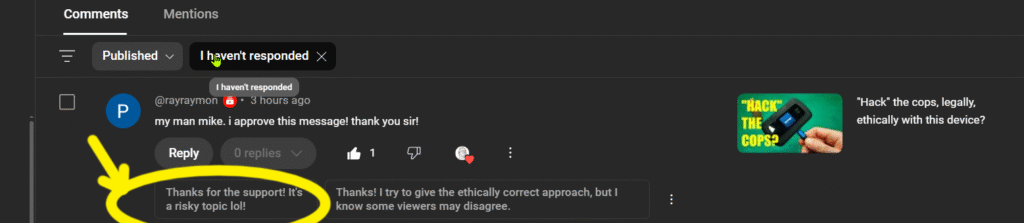
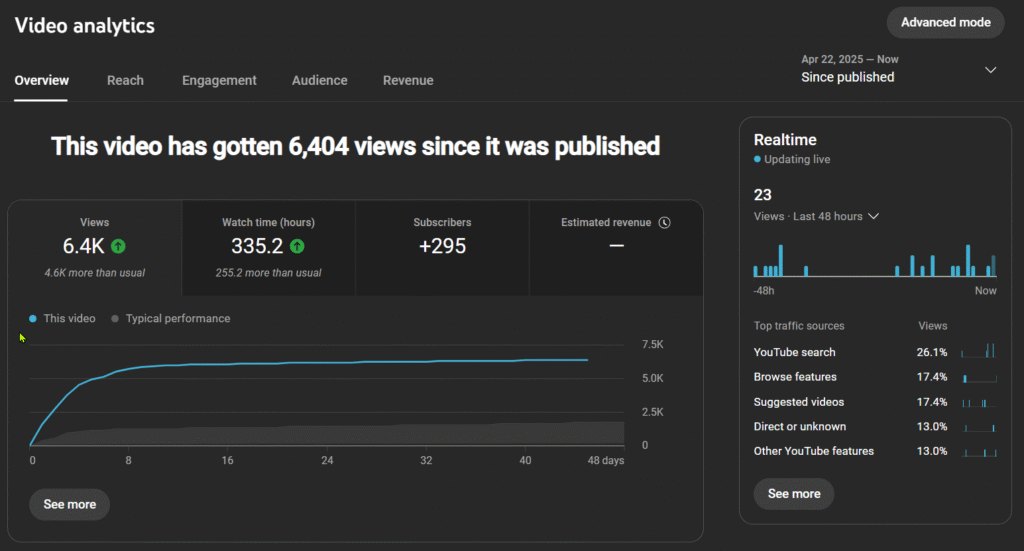
Even the EFF, whose project and organization I was promoting in the video, refused to acknowledge it!
The channel was once the fastest-growing channel on YouTube but we’ve since stalled out at 7K subs. Despite the YouTube algorithm antagonism, I’ve had modest success. For example, PCBWay, whose boxes you’ll see around the room, sponsors the channel.
So, if as a result of my demonstration you decide that you don’t like soldering you can design a PCB and have PCBWay fabricate it for you!
I just recently learned how to create PCBs. With the help of AI showing me how to navigate the KiCad interface, I created my first PCB in about four hours. I made this USB breakout board for use with the countercades I build. Checkout this video to see all the challenges I had to overcome!
But, the most successful video on the channel is “Pwnagotchi Tutorial, Pt. 1: Hardware.” In that video I build the eponymous Pwnagotchi: “An A2C-based (Advantage Actor-Critic) ‘AI’ powered by bettercap that learns from its surrounding Wi-Fi environment in order to maximize the crackable WPA key material it captures.”
It’s basically a Tamagotchi, a digital pet, that feeds off and captures Wi-Fi keys.
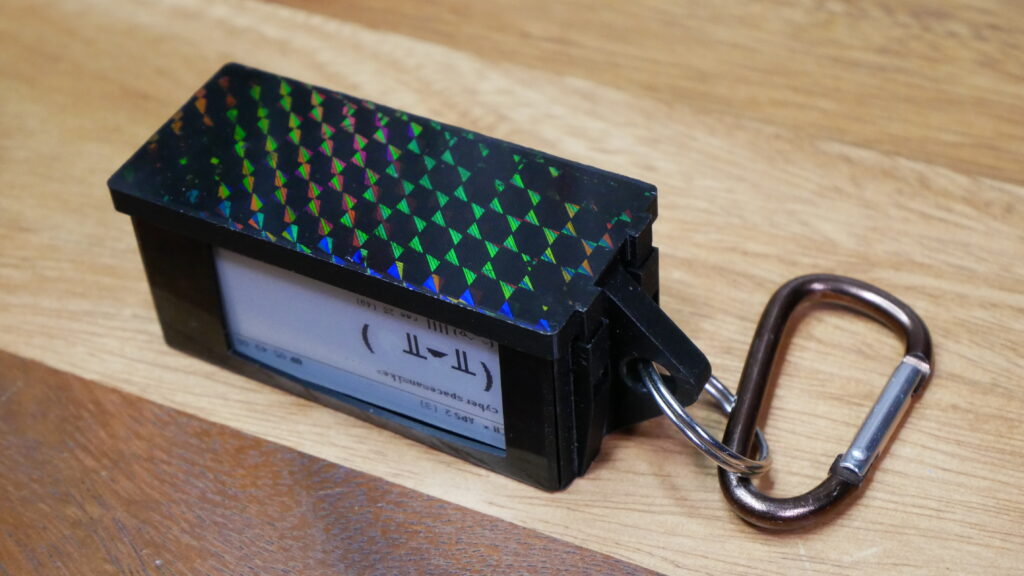
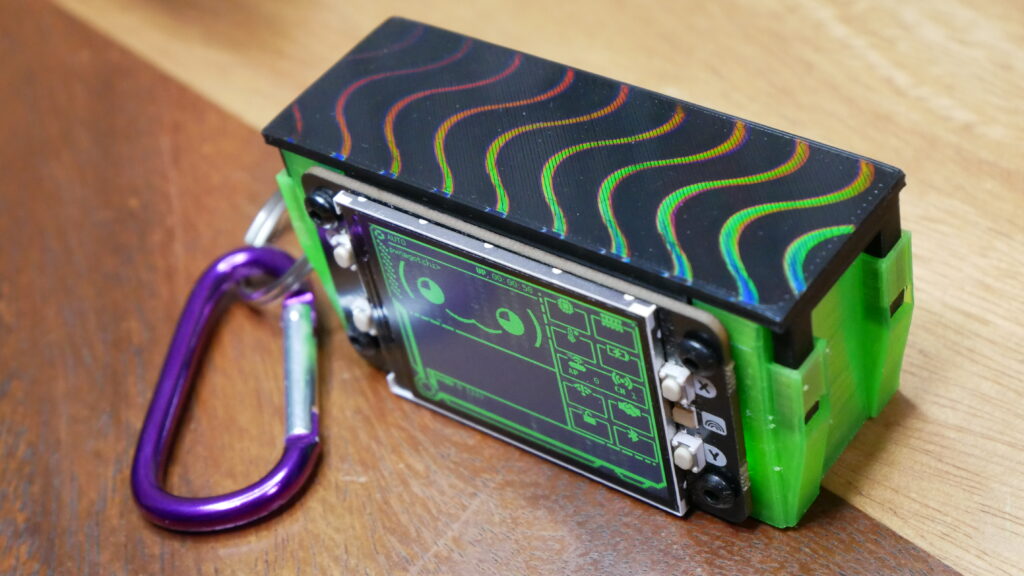
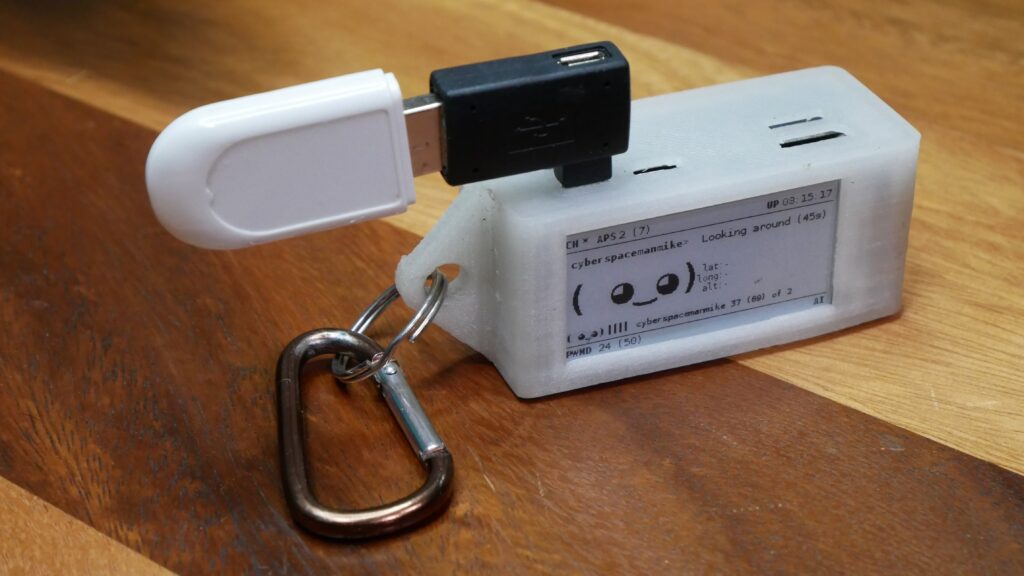
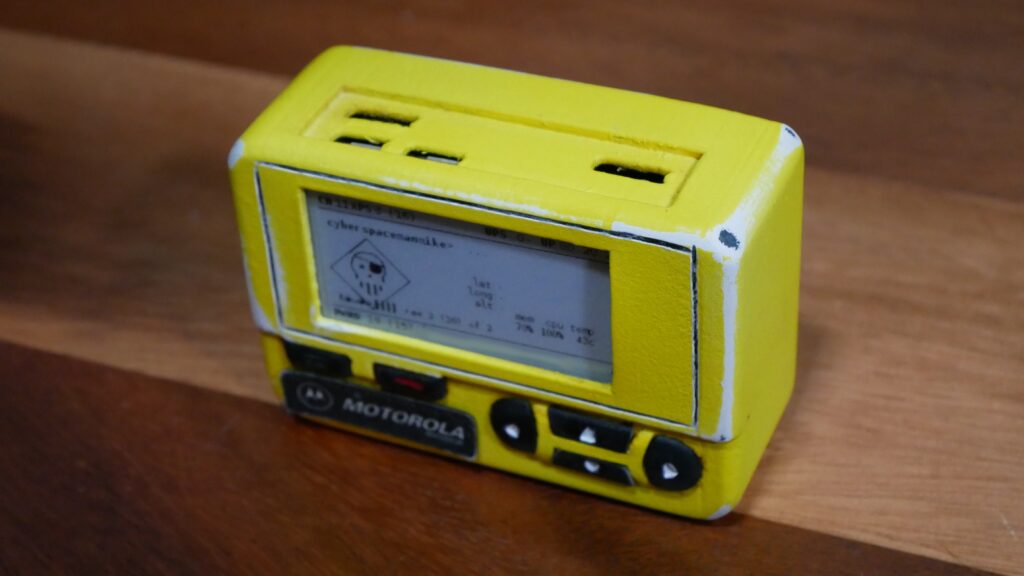
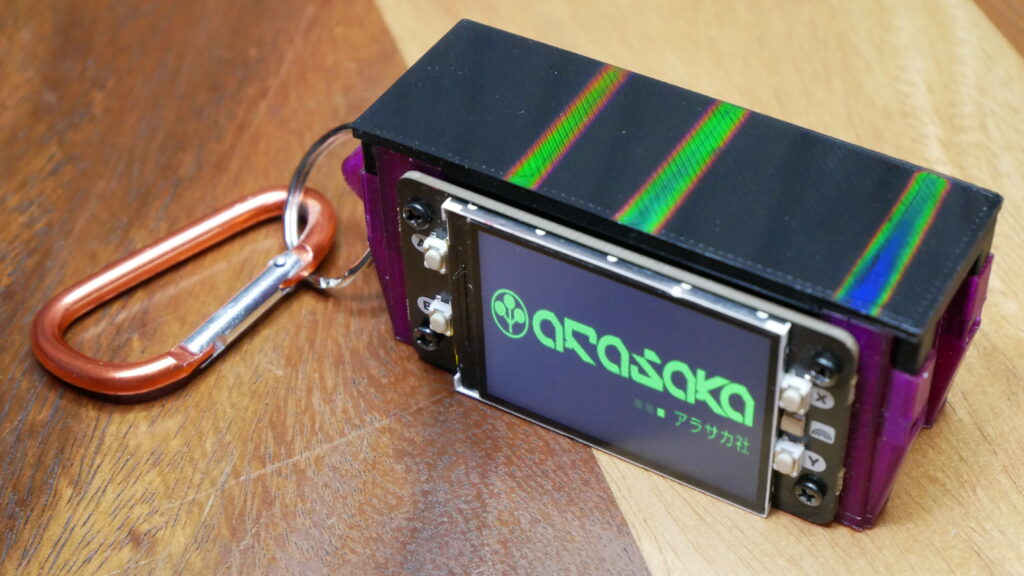
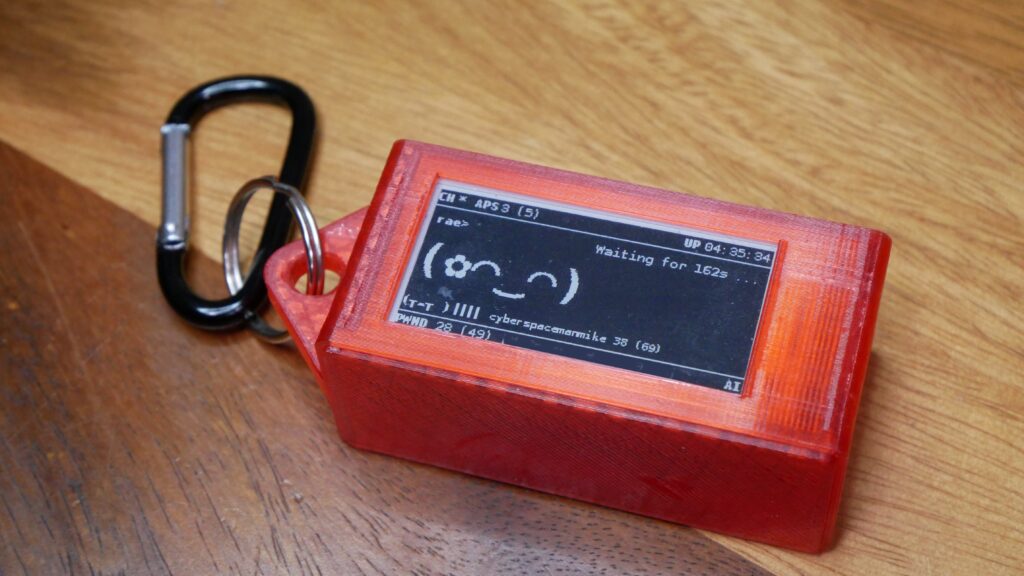
Here you can see all the Pwnagotchis that I’ve created. They actually talk to each other. I’ve written a few scripts for the devices, but my contribution to the Pwnagotchi project has been mainly to publicize it through tutorial videos and to engineer good-looking cases for it. And to publicize it here through my BSides Buffalo 2026 Pwnagotchi presentation.
As evidenced by the rather shoddy treatment by the YT algorithm, hackers and hacking in general have a PR problem, and one of the best ways to solve it is with cool and engaging stories and shiny gadgets.
So, for example, this case (Fig. 1.1) I engineered to 3D print with five of its six sides face-down to maximize transfer of the print bed’s prismatic pattern. Unlike code or console commands, it is shiny and more suitable for socials, where it will likely reach a broader audience of potential recruits.
And this case (Fig. 1.2) is modeled after Cereal Killer’s Motorola pager as seen in the movie Hackers. These are basically gateway gadgets into the world of hacking.
The moral of the story is that, even if you only want to be “culturally cyber,” you can still contribute to the fight for open access and information even if you’re an artist. Not everyone has to write exploits. Somebody has to make the movement look cool.
🚀 Become a Cyberspaceman/Woman – Unpaid Internship Opportunity
Having trouble getting experience without a job? Finding it difficult to get a job without experience? Square that vicious circle with an internship.
Cyberspacemanmike is bringing on interns to help grow a fast-moving content platform focused on hacking culture, cybersecurity job hunting, and scambaiting.
🛠 Responsibilities
- Co-host CTF livestreams and engage with the community in real time
- Assist in creating content around cybersecurity careers and job hunting
- Help produce scambaiting videos
- Collaborate on new ideas to grow the brand and audience
✅ Basic Qualifications
- Strong interest in cybersecurity / ethical hacking
- Comfortable speaking on stream
- Familiarity with streaming and video editing software (OBS, TouchPortal, HitFilm)
- Familiarity with CTFs, Linux, or basic security concepts
- Self-motivated and able to work independently
- Decent communication skills
⭐ Bonus
- Experience with WordPress and PHP
- Game development experience
- Experience with BTCPay Server or crypto tools
💡 Compensation
This is an unpaid internship, but you’ll gain real-world experience, build a portfolio, and get exposure in the cybersecurity community.
📬 Interested?
Reach out with a short video intro about yourself and any relevant experience or projects.
#cybersecurity #internship #ctf #infosec #contentcreation BSides Buffalo 2026 Pwnagotchi
📡 Why Build a Pwnagotchi?
Now, if you insist on staying on the right side of the law and only probe networks and devices that you are legally entitled to, the Pwnagotchi is of limited use. But it is of superior use as a learning tool.
First and foremost, it’s a fun introduction to Linux. Especially early on, any project that makes you work hands-on with Linux is going to make you a better cybersecurity doer. It will also familiarize you with wireless protocols, cybersecurity tools, and networking. Just about everyone can learn from this project; for example, before I was introduced to the Pwnagotchi, I didn’t even know it was possible to do Ethernet over USB! I also learned that a WiFi key can be recovered simply by sniffing a single packet even without any clients connected!
🔥 Soldering Isn’t Magic
But for our purposes today, the Pwnagotchi will be the impetus for us to learn some basic soldering.
A lot of people are hesitant to learn soldering because they mistakenly believe it’s all about some mystical technique practiced exclusively by bearded electronics wizards, and they tend to blame themselves when things go wrong.
When you’re starting out, it can be mystifying as to why things go wrong and just as seemingly inexplicable when things go right.
But it’s not.
Whether or not your soldering is successful comes down to:
- Materials
- Tools
- Temperature
- Technique
So, while technique is important, it’s not everything.
So far I’ve introduced myself and my channel, we’ve talked a little bit about what a Pwnagotchi is and why it’s useful. Now I’m going to begin the soldering demonstration and talk a bit about the M’s and T’s. Afterwards, we’ll talk a bit about the software installation and Pwnagotchi use.
🧱 Materials
I find that the most common material-related issue is unwittingly using lead-free solder when you think you’re using a leaded solder, and vice versa. Lead-free solder is much more difficult to heat up and work with and so, depending on how much you value your brain cells, I generally don’t recommend it for beginners.
Also, get good flux. Flux is basically a soldering cheat code. If you’re struggling, adding flux can solve an astonishing number of problems. Many beginners spend months trying to improve their technique when what they really needed was five dollars’ worth of flux.
Flux:
- Removes Oxidation
- Prevents New Oxidation
- Helps Solder Flow – Flux reduces surface tension, allowing the solder to “wet” the metal. Without flux, solder tends to bead up into little balls.
Finally, be on the lookout for counterfeit materials. Anything can be, and is, counterfeited. When I lived and worked in Asia, one of the things you had to be on the lookout for was counterfeit eggs. Not egg substitute, but counterfeit eggs made of plaster. It’s something that affected wholesalers more than consumers but I imagine some plaster eggs made it to retail. I feel that CCA, Copper Cladded Aluminum wire, is inherently counterfeit. But sometimes it’s passed off as genuine copper. Be aware!
🛠️ Tools
The tools you use can make or break success. The best example of this is the Hakko FX-888D that I used to use. I bought it because it was the gold standard for prosumer, hobbyist soldering irons. That reputation, I now feel, is undeserved. It had two buttons. Not up and down, as you might expect from a device whose primary function is temperature control. The buttons were UP and ENTER.
Trying to effect a temperature DOWN button press equivalent would sometimes inadvertently result in entering “Adjustment” mode; a mode where it looked like you were changing the temperature, but you were actually changing the offset.
The result was that the actual operating temperature could be off by as much as 150 degrees Celsius. Don’t ask me how I know.
That’s why I recommend this Pinecil portable soldering iron. It’s a third of the cost, a tenth of the size, and yet manages to incorporate a full-readout display. It’s powered by USB-C but has significant wattage requirements; I recommend this wall-wart (affiliate links).
🌡️ Temperature
The importance of temperature should be readily apparent, but know that for beginners the impulse is to always assume you need hotter temperatures than you usually do.
When you just start out, temperature is not far behind technique as the usual misattribution. If the solder isn’t flowing, the assumption is often that the iron isn’t hot enough. So the beginner cranks it up from 350°C to 400°C, then 450°C, and before long they’re attempting to solder Raspberry Pi headers at temperatures usually reserved for forging medieval weaponry.
The reality is that if the solder isn’t flowing, the problem is often somewhere else. The joint may be dirty or oxidized. You may need flux. The iron tip may be too small. The solder diameter might be too big. The component may be acting as a heat sink. Or you may simply not be heating both pieces of metal simultaneously. In all of these cases, adding more temperature treats the symptom rather than the cause.
In fact, excessive temperature often makes things worse. Flux burns off more quickly. Components are exposed to unnecessary heat. Pads can lift from the circuit board. Plastic connectors can soften or melt.
As a general rule, if you find yourself continuously increasing the temperature, you should probably stop and ask yourself why. Soldering should not be a battle between you and the laws of thermodynamics. Your actual adversary might be a dirty surface, insufficient flux, or some other issue. Or it might actually be your technique this time.
🔬 Technique
There are three main techniques that I use for soldering.
🔗 Joining Wires
For joining wires, I usually heat up a glob of solder on the end of the iron, twist the wires together, always remembering to position the heat shrink first, apply flux, and then rub the solder on the wires.
And you can tell you have enough on if the solder is shiny all the way around.
📍 Mini-Soldering
For mini-soldering, such as is the case with these headers, I apply flux, position the iron tip behind the pin to help heat it, and then feed the solder to the pin/iron pair.
Ideally, we’re looking for a conical-looking weld, but blobs are fine so long as they’re secure and don’t short.
My motto is:
Whatever works.
Of all the things you should feel self-conscious about, soldering isn’t one of them.
🧬 Micro-Soldering
For micro-soldering, my strategy is to secure solder to component A, and then melt it in place to component B. So, for example, in my Pineapple clone mod video, I secure solder to the board (sometimes called tinning), and then position the xxx on top of it.
Then I heat up the solder and the contacts of the IPEX UFL Connector simultaneously such that the Connector sinks into the melting solder (https://youtu.be/1wbfGbCJJt0?si=OwV-O2MdKD8wkAOF&t=102). Then I quickly remove the iron from the equation.
These three techniques make up 99% of my repertoire.
If we have time, we’ll talk a little bit about software installation.
💾 Installing Pwnagotchi Software
Once the hardware is assembled, it’s time to install the Pwnagotchi operating system and perform the initial configuration. Let’s begin.
Ed Note: This tutorial is based on the video tutorial and is considerably out of date. Consider skipping ahead to “How This Differs From Modern Pwnagotchi Installs.” Personally, I like using the older 1.5.5Fix image because it preserves the reinforced learning elements that newer installs lack.
📝 Flashing the Image
Begin by downloading Pwnagotchi image 1.5.5Fix (if you can find it) and flashing it to a microSD card using a tool such as Balena Etcher.
After the image has been written and verified:
- Remove the microSD card.
- Reinsert it into your computer.
- Navigate to the root directory of the boot partition.
- Create a file named:
config.toml- Copy the sample configuration from the Pwnagotchi documentation and paste it into the file.
At a minimum, you’ll want to:
- Assign your Pwnagotchi a name.
- Configure any network whitelists.
- Add your home Wi-Fi SSID so that you don’t accidentally pawn yourself.
If you’re using a Waveshare V3 display, ensure the display parameter is configured appropriately.
Once the configuration file has been saved, insert the microSD card into the Raspberry Pi and power the unit on.
🔌 Ethernet Over USB
The easiest way to configure a newly built Pwnagotchi is over Ethernet-over-USB.
Connect the data micro-USB port on the Raspberry Pi Zero to your computer using a USB cable capable of carrying data.
On first boot, be patient.
The Pwnagotchi generates cryptographic keys during the initialization process. Interrupting power during this stage can result in corrupted keys and an unusable installation.
Once the unit has finished booting, a new network interface should appear on your computer.
Configure the interface with the following settings:
IP Address: 10.0.0.1
Netmask: 255.255.255.0
Gateway: 10.0.0.1
DNS: 8.8.8.8 (or your preferred DNS provider)
If the interface does not appear:
- Verify that you have the appropriate RNDIS drivers installed.
- Verify that your USB cable supports data transfer and is not power-only.
🔑 SSH Access
Once the interface is configured, connect to the Pwnagotchi using SSH.
ssh pi@10.0.0.2or use PuTTY with:
Host: 10.0.0.2The default password is:
raspberryChange it immediately after logging in:
passwd⚙️ Important Configuration Settings
One of the first files worth studying is:
/etc/pwnagotchi/config.tomlThis file controls most of the device’s behavior.
Another useful file is:
/etc/pwnagotchi/default.tomlwhich contains the default settings that can be overridden in your configuration.
You’ll also want to familiarize yourself with:
- Where handshakes are stored
- Plugin configuration
- Whitelisting
- Network behavior
- Display settings
📡 Deauthentication
One setting worth discussing is deauthentication.
By default, many Pwnagotchi installations send deauthentication frames to encourage devices to reconnect, allowing the handshake process to be observed and captured.
This behavior can be disabled through configuration.
Fortunately, WPA-crackable material can often be collected without actively deauthenticating clients. Handshakes occur naturally, and in some cases PMKID information can be obtained directly from access points.
For those wishing to remain as passive as possible, disabling deauthentication is a viable option.
🌎 PwnGrid
Pwnagotchi can optionally participate in the PwnGrid ecosystem.
When enabled, devices can:
- Announce their presence
- Contribute network statistics
- Participate in leaderboards
- Exchange encrypted messages
- Interact with other Pwnagotchis
Participation is optional and can be adjusted or disabled entirely through configuration.
🤝 Making Friends
One of the strangest and most charming features of the Pwnagotchi is its ability to interact with other nearby units.
When multiple Pwnagotchis operate in close proximity, they can exchange information and coordinate channel selection to improve coverage.
It’s one of the features that transforms the project from a mere Wi-Fi tool into something that genuinely feels like a digital pet.
🌐 Web Interface
A stripped-down web interface is also available.
Navigate to:
http://pwnagotchi.local:8080or replace “pwnagotchi” with your device’s hostname.
Default credentials:
Username: change-me
Password: change-me
From here you can monitor activity and perform basic management tasks.
🔄 How This Differs From Modern Pwnagotchi Installs
Since this original tutorial was published, the installation process has changed considerably. At the time, the primary challenge was obtaining a combination of image version, display version, and configuration that would actually boot and function correctly. Much of the community effort revolved around working around display hardware compatibilities and aging software dependencies.
Today, most users install one of the actively maintained community forks rather than the original images (Jayofelony, aluminum-ice 1.7.6). Support for newer Raspberry Pi hardware is significantly better, display compatibility is less painful, and many of the workarounds that were once mandatory have either been automated or eliminated entirely.
The core concepts remain the same flash an image, configure the device, connect over USB, and customize the configuration, but the modern installation experience is generally much smoother than it was during the early Pwnagotchi era. The trade-off is that newer images lack some of the features of the original, such as the A2C-based ‘AI.”
That’s it! This has been my BSides Buffalo 2026 Pwnagotchi presentation. We introduced myself and my channel, talked about the importance of the pwnagotchi, and learned the importance of materials, tools, technique, and temperature whe soldering. Time permitting, we even got through an overview of pwnagotchi software installation! Thanks for joining us, I hope you’ll put your cases and stickers to good use!