
I’ve been working on a custom terminal dashboard for Kali Linux, and I’m finally ready to share it. Introducing the Cyberspacemanmike Operations Center, a lightweight, customizable cybersecurity dashboard that combines system monitoring, network information, an interactive terminal, and frequently used security tools in one interface. Download the Cyberspacemanmike Terminal Dashboard today, for free!
The project started with a simple idea: I wanted a terminal workspace that looked great, provided useful information at a glance, and eliminated some of the repetitive tasks involved in working with Kali Linux. Rather than settling for another terminal theme or resource monitor, I decided to build a dedicated application.
And, naturally, I wanted it to look like something out of The Matrix.
Meet Cyber Ops Center, the Cyberspacemanmike Terminal Dashboard
Cyber Ops Center is written in Python using GTK3 and VTE, the terminal emulator library used by many Linux terminal applications.
It isn’t just a decorative dashboard. It’s a functional workspace designed for penetration testing, cybersecurity labs, CTF challenges, and everyday Linux administration.
The application currently includes:
- Embedded interactive terminal: A fully functional shell directly inside the dashboard.
- Live system telemetry: CPU load, memory utilization, disk usage, and uptime.
- Network monitoring: Interface information, active connections, and a live RX/TX traffic graph.
- Command suggestions: A searchable dropdown of commonly used commands and tools, with descriptions and TARGET preloaded (this is my favorite, most used feature).
- RECON NOTEBOOK: Save and organize IP addresses, hostnames, MAC addresses, and notes, with automatic clipboard copying when selecting a saved IP. Includes a separate credentials notebook for storing usernames, passwords, associated hosts, and notes, with passwords protected by the system keyring.
- HOSTS management: Create or update custom hostname aliases in
/etc/hostswithout manually editing the file. Defaults toTARGETwhen no hostname is specified (also a favorite and frequently used feature). - SSH server controls: Start and stop Kali’s incoming SSH service with confirmation and authorization.
- LIVESTREAM MODE: Conceal sensitive information in ACTIVE CONNECTIONS and NETWORK INTERFACES while keeping the terminal and RECON NOTEBOOK fully functional. HOSTS fields remain editable with their characters masked.
- Adjustable background opacity: Make the darkest background surfaces transparent while preserving readable controls.
- Customizable terminal font: Select your preferred font family and size, with settings saved between sessions.
- Two themes: Matrix and Cyberwave.
Two Themes, One Operations Center
One of my priorities was making the application visually appealing without sacrificing usability. Matrix uses subdued greens against nearly black backgrounds, creating a terminal aesthetic inspired by the classic film. Cyberwave uses muted lavender, purple, and blue tones for a retro-futuristic appearance.
Both themes share the same functionality, and the interface avoids unnecessary clutter. I also wanted the dashboard to be useful while recording videos or livestreaming, which led to the addition of LIVESTREAM MODE.
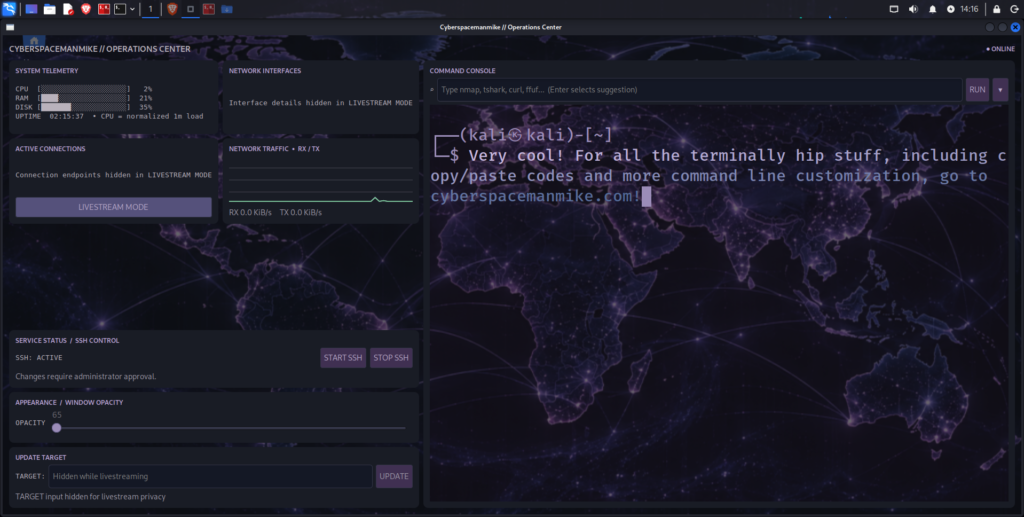
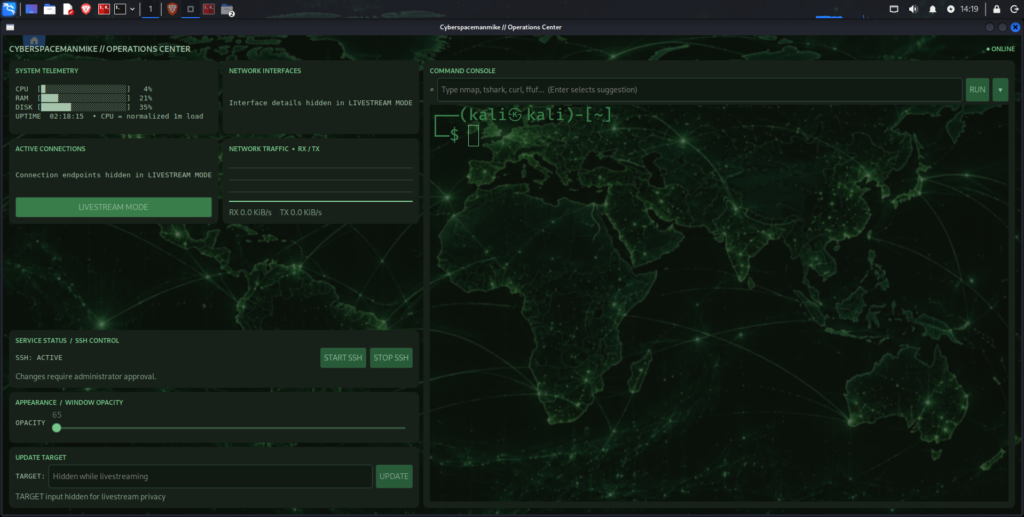
LIVESTREAM MODE
Anyone who creates cybersecurity content knows how easy it is to accidentally expose an IP address, MAC address, or other identifying information while demonstrating a tool.
LIVESTREAM MODE masks sensitive identifiers in the dashboard’s network information and TARGET controls.
Importantly, it does not hide or sanitize the embedded terminal. That was a deliberate decision because the terminal needs to remain usable during demonstrations. It also does not anonymize network traffic or conceal information in other applications. You still need to review what appears in your terminal before broadcasting.
An Actual Terminal, Not a Simulation
The embedded terminal is powered by VTE, meaning it runs a real interactive shell. You can execute commands, run tools, interact with programs, and use your normal Linux environment. I also customized the terminal’s mouse behavior:
- Right-click pastes directly into the terminal.
- Shift + right-click opens the traditional context menu.
- Command suggestions insert text at the shell prompt without immediately executing it.
That last feature is particularly useful when working with tools like Nmap. You can select a command template, modify its arguments, and execute it when ready.
Updating /etc/hosts
During penetration testing and CTF challenges, I frequently need to update a hostname such as TARGET to point to a new machine. Ordinarily, this involves opening /etc/hosts with elevated privileges and editing the entry manually, inadvertently exposing sensitive data during livestreams.
Cyber Ops Center provides a dedicated TARGET field to streamline the process.
Because /etc/hosts is a protected system file, the application uses a separate privileged helper and PolicyKit authorization rather than running the entire dashboard as root.
The helper also preserves unrelated hostname entries and creates a backup before its first modification.
Requirements
Cyber Ops Center is intended primarily for Kali Linux with an X11 desktop environment.
It requires:
- Python 3
- GTK 3 and Python GObject bindings (
python3-gi) - VTE 2.91 Python bindings (
gir1.2-vte-2.91) - GTK 3 introspection bindings (
gir1.2-gtk-3.0) python3-psutilpkexecandpolkitdfor privileged operationssystemdfor SSH service controls- A compositing window manager for background transparency
Kali’s XFCE desktop is a suitable environment, provided its compositor is enabled.
The application may work on other Debian-based distributions, but those configurations have not been fully validated.
Download Cyber Ops Center
The application is free to download, and the source code is included.
Download Cyber Ops Center v0.84 ZIP
The archive includes the following files:
ops_center.py— Main GTK3 dashboard application.hosts_update.py— Privileged helper for updating/etc/hosts.install.sh— Installation script and launcher setup.README.md— Documentation, features, and release notes.
Installation
Download the ZIP archive, open a terminal in the directory containing it, and run:
sudo mkdir -p /opt/cyber-ops-center
sudo unzip -o cyber-ops-center-v0.7.zip -d /opt/
cd /opt/cyber-ops-center
bash install.sh
The installer checks for dependencies and reports missing packages. It does not automatically install system packages.
To allow it to install missing dependencies, use:
bash install.sh --install-depsAlternatively, install the principal dependencies yourself:
sudo apt update
sudo apt install python3 python3-gi python3-psutil gir1.2-gtk-3.0 gir1.2-vte-2.91 pkexec polkitd
The installation creates a launcher at:
~/.local/bin/cyber-opsTo start Cyber Ops Center with the Matrix theme:
~/.local/bin/cyber-ops --theme matrixOr launch the Cyberwave theme:
~/.local/bin/cyber-ops --theme cyberwaveYou can also override the background opacity at launch:
~/.local/bin/cyber-ops --theme matrix --opacity 0.85The installer creates a desktop entry as well.
Installation note: In v0.7, the installer copies the application into ~/.local/share/cyber-ops-center/. If you modify the source under /opt/cyber-ops-center/, reinstall to update the running copy. A future release will simplify this arrangement.
Security Considerations
Cyber Ops Center is intended for authorized cybersecurity work and educational environments.
The SSH controls manage the local incoming SSH server. They do not disable outgoing SSH connections.
Operations that modify protected system settings require elevated authorization. As with any application that runs shell commands, review commands before executing them, particularly when working with privileged operations or unfamiliar targets.
The application has undergone source-level and syntax checks, but it has not been exhaustively tested across every Kali Linux configuration.
What’s Next?
The current release is v0.7, and development is ongoing.
The next major improvements will focus on simplifying the installation architecture and making application preferences easier to manage.
Planned enhancements include:
- A single authoritative application directory under
/opt/cyber-ops-center/. - Persistent configuration under
~/.config/cyber-ops-center/. - Configurable terminal font family and size.
- Continued improvements to the command interface and dashboard controls.
The goal is to keep the application lightweight, practical, and easy to customize.
Final Thoughts
Cyber Ops Center began as an experiment in building a more personalized Kali Linux workspace. It has since evolved into an application that combines several everyday cybersecurity tasks in one place. For me, the appeal isn’t simply having a cool-looking terminal. It’s having an environment that feels purpose-built for the work I’m doing. And there’s something satisfying about launching Kali Linux and being greeted by your own custom operations center.
If you give it a try, let me know what you think, what works, what doesn’t, and what features you’d like to see in future releases.
Cyberspacemanmike
Hacking, making, gaming