
The following is a transcript for the video “Radical Edward’s Pwnagotchi Cyberdeck (and how to keep your Custom Faces Mod from crashing everything)!”
Introduction
Radical Edward is a “seven foot ex basketball pro, hindu, guru, drag queen, alien.” She’s the galaxy’s most elite hacker and, at one time, a member of the spaceship Bebop and its space-bound bounty hunting crew. In a bit of deft anime world-building, her computer, named Tomato, is cobbled together and housed in a cardboard box and I decided to recreate it as the world’s most impractical pwnagotchi case!
Custom Faces
The first step was to create a custom-faces-mod for the pwnagotchi. Many of the avatar’s emotes are ripped straight from the Cowboy Bebop series. But the avatar in the anime doesn’t run the full gamut of pwnagotchi emotions so some had to be inferred, even invented. This took many iterations to get to the point that I was satisfied with it. The Radical Edward custom-faces-mod files are available for free from the cyberspacemanmike.com shop.

Face Installation and How to Keep Your Custom Faces Mod From Crashing Everything!
Getting the faces to install and work was a wholly separate project. Originally parts of the face failed to render. Some troubleshooting and experimentation was necessary; eventually I realized that the prescribed image dimensions were too small and the line work too thin. Pictured are the before and after. After finally getting the faces to install and work correctly, I noticed that they still didn’t work correctly. Radical Edward’s avatar wouldn’t look left or right. A closer inspection of the github tutorial revealed that some of the code was wrong. See if you can spot the difference:
ui.faces.look_r = "/custom-faces/LOOK-R.png"
ui.faces.look_l = "/custom-faces/LOOK-L.png"
ui.faces.look_r_happy = "/custom-faces/LOOK-R-HAPPY.png"
ui.faces.look_l_happy = "/custom-faces/LOOK-L-HAPPY.png"
should read:
ui.faces.look_r = "/custom-faces/LOOK_R.png"
ui.faces.look_l = "/custom-faces/LOOK_L.png"
ui.faces.look_r_happy = "/custom-faces/LOOK_R_HAPPY.png"
ui.faces.look_l_happy = "/custom-faces/LOOK_L_HAPPY.png"
Did you spot it? The first block incorrectly references the .pngs, using dashes instead of underscores. The updated code references the .pngs using the prescribed naming conventions . After updating config.toml, Radical Edward’s avatar was able to look back and forth.
Modeling Radical Edward’s Pwnagotchi Cyberdeck
Next up was modeling the case. My mantra was, originally; “it’s just a rectangle with a screen attached, this should be a breeze,” but sadly this was not the case. Get it? Not the case? So to achieve the effect of corrugation I created an insert mesh brush in max that was a segment of corrugation and dragged it along the box’s edges as a curve in zbrush. It looked good but in the end it didn’t really matter because the details were too small to show up in the test prints. I tried a bunch of post-processing techniques to create corrugated edges and settled on poking the edges repeatedly with my soldering iron. I’m happy with the results:
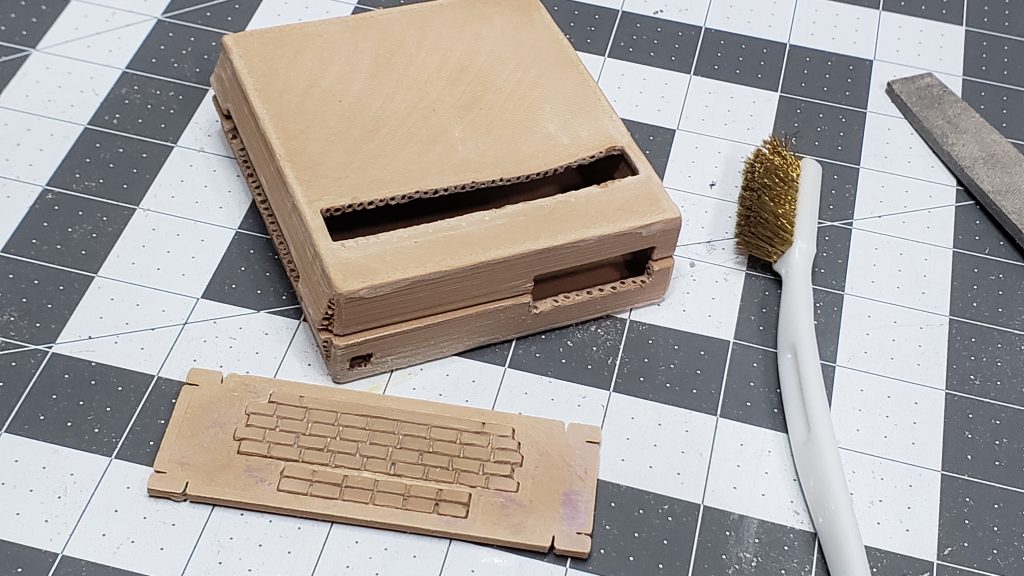
I also tried a number of techniques to create subtle corrugated ripples on the surface of the box; I dragged the soldering iron across it, tried sanding it, tried filing it. I also tried to imprint wires onto it after heating the box with a hot air gun. Nothing worked though so I abandoned all attempts at creating sub-surface corrugation effects. Using the hot air gun did however cause the print to sag in convincing, box-like ways so I reused that tech on subsequent attempts. Finally I used a Dremel with an 80 grit flap wheel to soften the edges and to add a bit of wear and tear. I was happy with these results too.
Then tragedy struck as my printer stopped printing good. This was the perfect time to take it apart and fix it and do an upgrade and also assemble another table and enclosure and printer in anticipation of more 3D print orders on cyberspacemanmike.com. Here’s me pantomiming finishing up the table build because I forgot to take off the lens cap the first time around. On Black Friday there was a sale on an Ender 3 Max Neo so I got that and it made me happy. After a few days delay I was back in business.
After trying a couple different moddeling techniques for the keys on the keyboard, I settled on box moddeling, as opposed to sculpting, and printed a few to experiment with. Knowing that I couldn’t print out the server rack handles, I decided to use paperclips. Unfortunately, for reasons likely to do with resolution, the keyboard bezel didn’t print with the accomodating holes. So, much like with my celebratory computer mod (please check it out, it isstarved for views), I decided to print a drill guide and then added holes manually. To make sure the server rack handles were straight, level, and would be the same height, I created this mounting jig using electrical tape and paper clamps. The results provided me fleeting happiness as well.
For the IDE cables, I used IDE cables, but scaled them down. I superglued these into place as a semi-permanent solution. Things were finally starting to go smoothly.
Then, tragedy struck. What I thought had been a micro SD extender arrived in the mail as an SD adapter. It was way too big. I played Tetris with the Pi and PiSugar until I got a workable layout. One good thing to come about from the changes is that it is now possible to access the Pis ports from the back of the box. To facilitate this the vent grates needed to hinge. I decided to implement a living hinge, and in keeping with theme, used tape.

Clearance was an issue. The box top wouldn’t sit right. I tried soldering the wires directly to the header. If you saw the live stream, you know this wouldn’t have gone well. In addition to being a bit of a travesty, the header and wires were still too tall. So I soldered the wires directly to a new board and structurally reinforced the wires with hot glue goo. This worked very well and I was happy with the results.
The monitor bezel went through about eight different prints ranging from the first, which fit perfect, to the eighth, which fit super duper perfect. To make it fit even more super duper perfectly I removed the header on the screen. Originally I tried using solder wick, which didn’t work very well. I tried recording all the failures but failed; the file was corrupt. Fixing it meant buying a hundred dollar software package so please enjoy a hundred dollars worth out of this footage. I finished the job by snipping the contacts along the bottom and wiggling the header until the contacts along the top fatigued and broke. The wiring may not look canonical, but actually is, as nothing on Tomato is canonical. Nowhere is this more evident than with the cyberdeck’s decals.
Decals
Determined to get it right, I scoured the anime and manga and took screenshots of every scene that provided additional or alternated visual information. The writing on the computer appears in some scenes and not in others, is sometimes legible and sometimes not, is often obscured, and sometimes the writing changes altogether. So I cobbled together the closest approximation I could and got to work in Flash, the greatest image editing software of all time, Flash, we eagerly await your return. Then I printed out the images as waterslide decals and began experimenting. I found that I could knock some of the reflection off with matte clear coat but that the supposed-to-be transparent portions were still very visible. So I researched alternate techniques, printed the decals backwards on a magazine page taped to printer pages, and transferred them to the 3D print using nail polish… only it didn’t work. So I bought different nail polish and a different, more masculine magazine (I think we can go more butch), and tried again… but it didn’t work.
Now, normally I know enough not to listen to sock puppets, but this puppet seemed nice. He said I should print onto a piece of stickerless sticker paper and transfer the print using Heavy Gel Medium. So I tried that… but it didn’t work. So it was back to using waterslide decals.
The final decals required printing on a color laser printer and so I went to the Buffalo Public Library system and they said they wouldn’t do it for fear that my laser printer paper might break their precious laser printer. Fed up with the world in a milder Michael Douglas, Falling Down sort of way, I decided to have the following exchange with them:
Keep in mind that in addition to paying taxes I volunteer taught at and donated to this library and they wouldn’t reciprocate so much as printing a piece of paper. It would be great fun for me if, in addition to liking and subscribing, you all could get the #defundTheBuffaloPublicLibrary hashtag trending.
I attempted to add color to the decals with acrylic markers but didn’t get the results I wanted. So I bought a new color laser printer on higher purchase.
On a note wholly unrelated to all my recent expensive and ill-advised purchases, I’m launching a Patreon! Joining will give you free access to all the digital downloads, like the CompTIA Security+ Audio Flash Cards and the 3D files for Radical Edward’s Pwnagotchi Cyberdeck which I’m pricing at $5 if only to hopefully discourage people from attempting this crazy timesink. Just kidding, ultimately it was very fun.
With the decals set I added the tape holding it all together and for the tape I used tape. And here is the completed project, I present: Radical Edward’s Pwnagotchi Cyberdeck!
Then it was finally time for final assembly.

A special thanks to Discord member Radical Edward who gave me the idea… plot twist, to create a Hackers movie themed pager pwnagotchi case, up next! Thanks for watching “Radical Edward’s Pwnagotchi Cyberdeck (and how to keep your Custom Faces Mod from crashing everything)!”